
Using Collector App for Pedestrian Archaeological Survey
Problem Description
Pedestrian archaeological survey, or surface survey, occurs when archaeologists walk across a given area to record whether artifacts are visible on the surface. Often, the presence of surface finds is connected to buried artifacts nearby. Usually recording artifacts requires the use of single sheet paper to document artifact attributes, such as type, age, placement, and date of discovery. Keeping track of the individual papers in the field and later in the laboratory can be an arduous task. Utilizing a created Collector app will streamline the process, with potentially less loss of data. As a smart phone is almost a necessity for work today, non-GIS workers do not need extra materials to conduct survey electronically.
Analyses Procedures
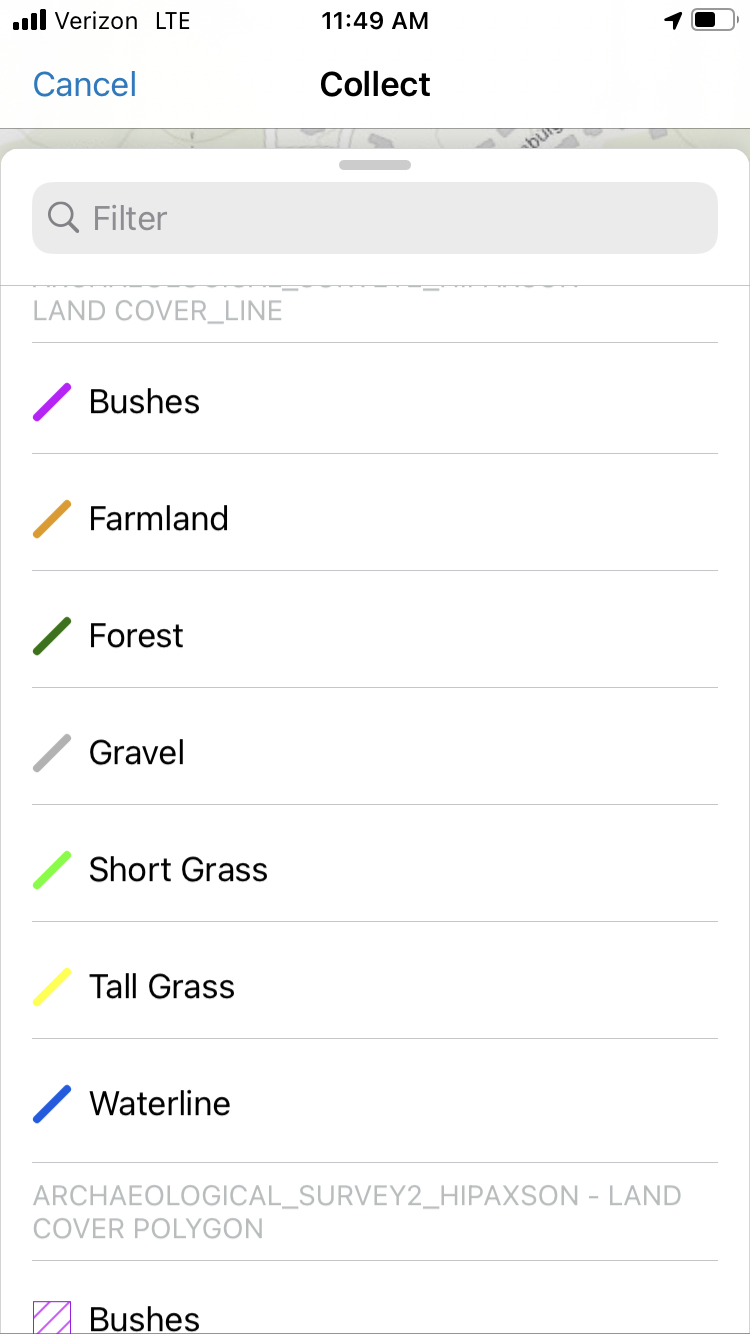
The design for the web mapping Collector app recorded two types of shapefiles: lines and polygons. Lines were used for single-row pedestrian survey (one person would record a single line), while the polygons were for a more wandering approach. The main attribute record was the land cover type, such as short grass, gravel, forest, and farmland. This quickly allowed future researchers to know the environmental conditions where the artifact was found and to plan for potential excavation. Other attributes recorded were the land ownership type (useful for knowing the potential legal conditions for excavation), the person conducting the survey, date, the artifact types, and notes. Recorded lines and polygons were saved to feature classes uploaded to an ArcGIS Online Map to easily view the results.
Results
The application allowed for quick documentation of artifacts discovered during archaeological survey. In the resulting features classes, records could be filtered by person or date for later analysis in the laboratory. This would allow users to quickly see what surveys were conducted on a given day or artifacts based on land type. Using the environment types as the colored attribute allowed users to clearly view the conditions where the artifacts were located. The only known issue with the application is GPS accuracy. Depending on the required precision of the project, the accuracy of the application might not fall within the minimum parameters.

Reflection
Creating the Collector App granted me a better understanding of how to create GIS applications for the non-GIS professional. This was also the first time I used any GIS products on a smartphone instead of a desktop computer or laptop. This project was also the first time I created feature classes within ArcGIS Online versus uploading from another location. It taught me how to organize my attribute fields and selections within the ArcGIS Online website in an intuitive manner. The project helped expand my knowledge of web mapping applications and the variety in their creation. What I learned from this project matters, since it illustrated the potential difficulties in creating GIS web applications for the use by non-GIS users, since the applications should be easily understandable with little training in its use. I have my current job based on my knowledge of the Collector App, as I demonstrated this app’s functionality during my interview.
____________________________________________________________________________________________________________________________________
Creating a Web Mapping Geoprocesssing Application to Investigate the Impacts of a Proposed Power Line Corridor on Natural and Cultural Resources in the New River Gorge National River
Problem Description
Due to increasing power consumption concerns, the New River Gorge National River (NERI) was examined as a probable location for new high power transmission lines. As environmental impacts are part of the investigation process, researchers are required to assess the impact the proposed lines will have on the existing cultural and natural resources. The purpose of this project was to design an enterprise geodatabase and create web mapping applications to determine the probable impacts of different power line locations. The main goals of the web mapping application were to allow researchers to locate and query features within NERI and to identify buildings and vertebrate species within the corridor of the proposed power line locations.
Analyses Procedures
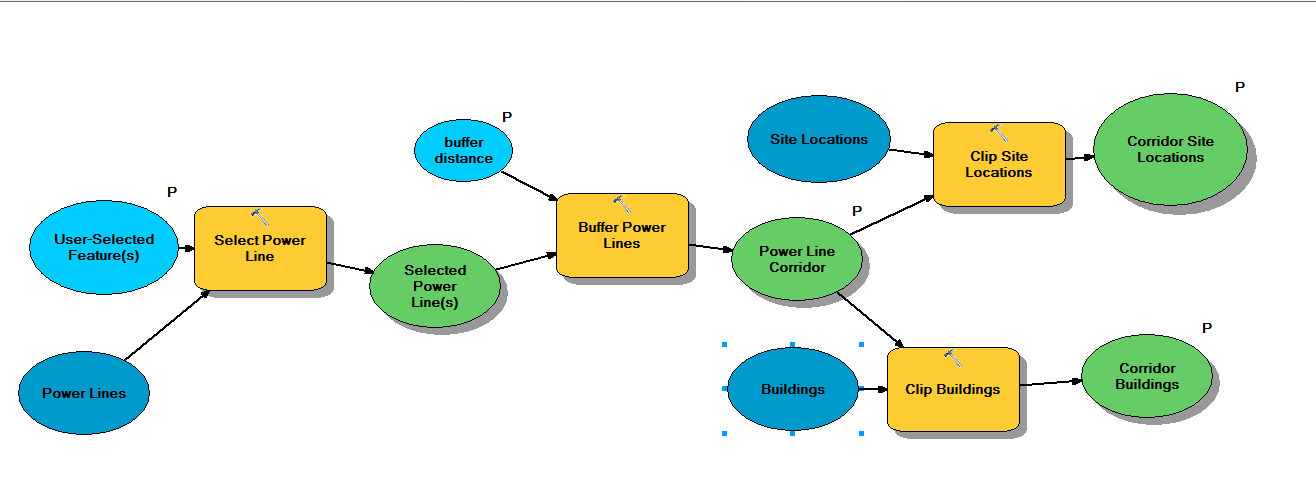
Data for the enterprise geodatabase was created from both geospatial layers and a prior Microsoft Access database utilizing PstgreSQL and ArcCatalog. After the geodatabase was functional, a map was produced in ArcMap to display the NERI features. Using ModelBuilder in ArcGIS, a model was created to execute specific geoprocessing tasks that located buildings and vertebrate observations within a proposed powerline corridor. Both map and model were published as web services and were used to create the web mapping application. The web mapping application was developed utilizing Web AppBuilder for ArcGIS and incorporated several tools for examining NERI features for the likely impacts of proposed power line location. Pop-up displays and widgets included in the web mapping application were configured to allow users easy access to the functionality and interpretations of the provided data and analysis outputs.
Results
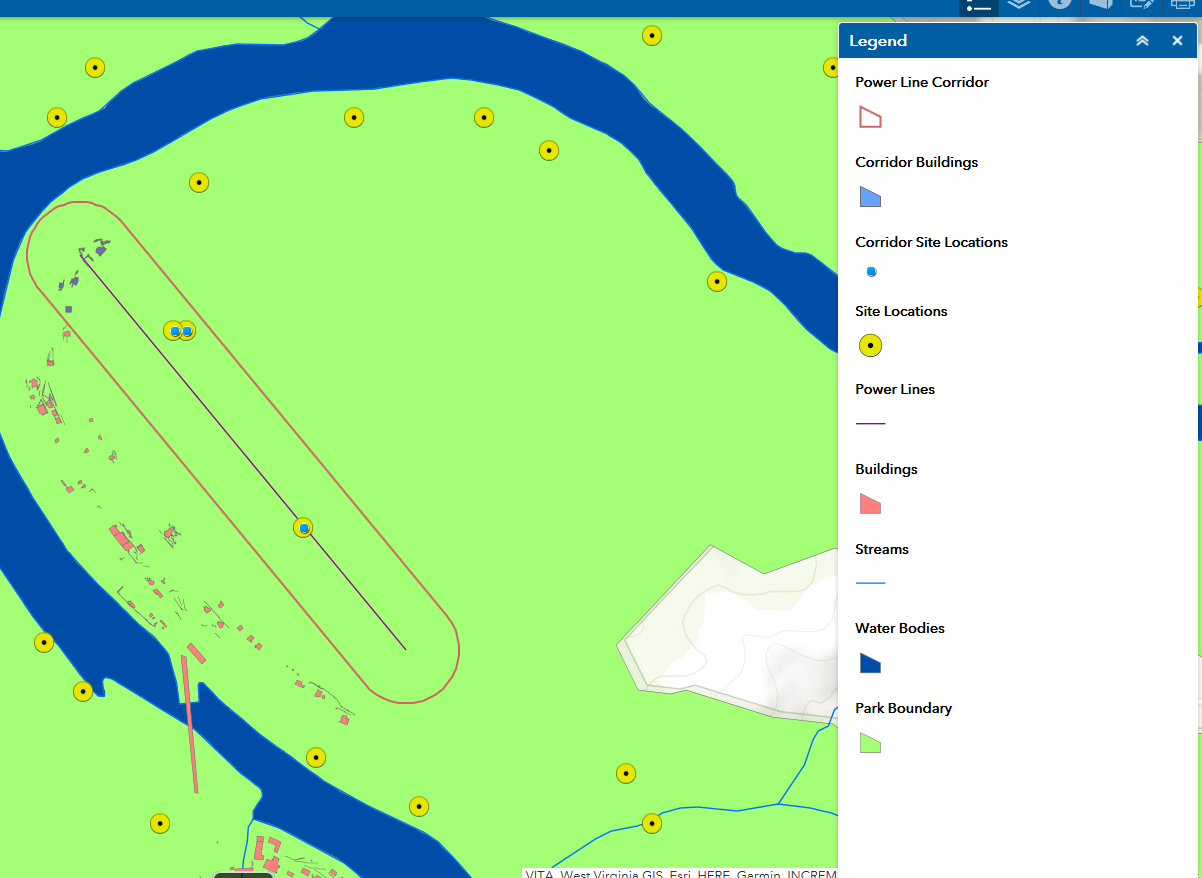
The final web mapping application incorporated a number of customized widgets which allowed users to view feature and resources within NERI and the probable cultural and environmental impacts of the proposed power line locations. Users could draw a proposed power line on the map, and subsequently run the power line impact tool to view the impacts on existing resources within a determined corridor of the proposed power line. The enterprise geodatabase and the feature service underlying the map data enabled users to create repeated edits or select any number of locations for the power lines.
Reflection
This project allowed me to design a public-accessible web service mapping application that allowed users to not only interact with the data, but also create and edit features, and employ geospatial processes to derive selected outputs with requested information. This project utilized multiple skill sets from database development and management, geospatial modeling within and without web applications, and web app development. As environmental reviews are a normal occurrence in construction planning, this project allowed me to see what would be included if this were a real scenario. This project allowed me to draw together different types of geospatial processes to create one web mapping application output for public use.
 Heather Paxson MGIST Portfolio